
How to choose LinkedIn content and outreach tools
By Bravabase · Updated
LinkedIn content tools help you prepare and plan posts. Outreach tools help you approach relevant people and manage follow-ups. If you need both, choose a setup that lets you move from a useful post to a conversation to a next action without losing the context.
Consider AuthoredUp for preparing posts, Taplio for content-led growth, Expandi or Dripify for outreach campaigns, and n8n for connecting an existing stack. Consider Bravabase when you want your writing, prospecting and conversations together. The right choice depends on the work you need to finish; the examples below explain what to check.
Which LinkedIn content and outreach tools should you compare?
Start with the task you want to make easier. These examples give you a focused shortlist, rather than asking you to trial every tool at once.
Reviewed 13 October 2026. Competitor descriptions come from the linked official product pages; we have not run a head-to-head trial. The checks in the last column are questions to test, not claims that a feature is missing. Bravabase publishes this guide and offers a paid workspace.
| Tool and focus | What the product describes | Check before choosing |
|---|---|---|
| AuthoredUp Content preparation | Post editing, previews, saved drafts, scheduling and content analytics. | Can you prepare a post you like, then find the replies and next actions in the rest of your setup? |
| Taplio Content-led growth | AI writing, post scheduling, analytics and engagement features. Taplio also describes outreach in its product overview. | Try one idea through drafting and a relevant conversation. Check which engagement and outreach features your chosen plan includes. |
| Expandi Outreach campaigns | LinkedIn and email outreach, conditional sequences, an inbox and CRM integrations. | Can you manage replies and stop the next campaign step when the conversation changes? |
| Dripify Outreach sequences | LinkedIn and email sequences, personalization, campaign reporting and an inbox. | Does your chosen plan cover the accounts and follow-up work you need, alongside your content routine? |
| n8n Connecting your tools | A workflow builder for connecting apps and adding AI steps. | Who will build and maintain the connections? Verify the exact actions and account access your workflow needs. |
| Bravabase Content, prospecting and conversations | Writing and planning, prospecting and Inbox conversations in one workspace. | Try the routine shown below. Automated Outbound was marked “Soon” in the account viewed on 12 October; confirm availability if campaign sending is essential. |
The categories overlap: a content tool can include outreach, and a campaign tool can include an inbox or AI assistance. Compare the whole routine you need, not just the category name. Can you prepare a useful post, review relevant prospects and continue a conversation without repeatedly piecing the context together?
Inside Bravabase
Give one useful idea somewhere to lead.
A post explains how you think. A conversation tells you what someone needs. Those questions give you ideas for your next post. Here is how the routine fits together in Bravabase.
The writing screen was captured on 12 October 2026. The post and reply below are fictional examples you can adapt; they are not customer results or a recorded AI generation. No post or message was sent for this walkthrough.
- Prepare the post
- Continue the conversation
- Plan the next useful post
01 · Make your expertise useful
Start with a problem your future customer recognizes.
Open Voiceprint → Write, choose a day and select Write post. The editor opens a place to write your draft and ask for changes. Keep the post focused on one lesson a reader can use.
A finished draft to work toward
A project brief needs one final decision-maker.
Three people can give useful feedback. But if nobody owns the final approval, a small change can turn into another round of revisions.
Before kickoff, agree:
• Who gathers the feedback?
• Who makes the final call?
• When is the brief approved?That gives the team a clear point to work from.
Who owns final approval on your next project?
What makes it useful: one familiar problem, three practical questions and an opening for a relevant conversation. Replace the example with a lesson you can stand behind.
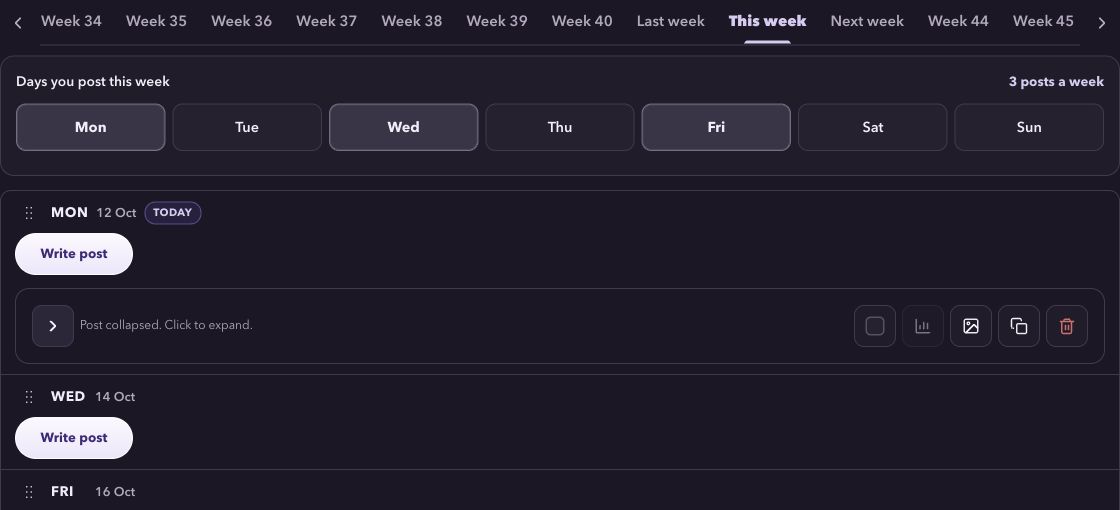
In your own working session, bring the lesson and your writing preferences into the editor. Review the draft until it sounds like something you would say. For this sample, you can try the free formatter to adjust spacing and emphasis before copying the text.
02 · Follow the question they actually ask
Give the reply the same attention as the post.
Suppose a reader asks how to handle a brief with three decision-makers. That is the start of a useful discussion. Open their conversation in Inbox, review the exchange and answer that specific question.
“Does each person approve a different part of the brief, or does everyone need to agree on the whole thing? I’d start by making that responsibility clear before the project begins.”
Adapt this illustrative reply to the conversation you actually have. If they request a checklist, send that resource; if they want to discuss paid help, agree what they need next.
03 · Let the conversation shape the next post
Answer the question more people might be asking.
If the same question keeps coming up, save it as an idea in your content calendar. Use your own experience to explain it in a future post, without sharing private conversation details. Your next writing session starts with a question you know matters.
Next post idea: how to collect feedback from three decision-makers without three rounds of revisions.
Opening: “Three opinions can improve a brief. Three separate approval processes can stall it.”
Useful takeaway: agree who collects feedback, who resolves disagreements and who gives final approval.
You now have a draft, a relevant reply and a clear idea for next time. The conversation improves the content; the content gives you something useful to discuss.
Includes the sample post, reply and next-post brief. Adapt the words to your own experience; this file does not publish, send or import anything.
Bring one idea and one conversation into your trial. Use content creation for the explanation, Inbox for the discussion. Use your own task list for any promise and agreed date. The connected workspace gives each part a place in the same routine.
This tour covers writing and conversations. Automated Outbound is marked “Soon” in the account viewed on 12 October 2026; confirm availability before choosing a plan for campaign sending.
What do you want LinkedIn to help you achieve?
If you sell expertise, your content helps people understand how you think. Outreach gives you a way to start a relevant discussion. Follow-up helps you keep the promises that come out of it. The right setup makes those jobs easier to repeat alongside the work you do for clients.
Start with the part that keeps stalling. You may need help turning an idea into a post, finding a useful reason to contact someone, or remembering what you owe a potential client. Each calls for a different kind of support.
| Your main problem | What to look for | A useful result |
|---|---|---|
| Good ideas never become posts | Writing support, saved ideas and a content calendar | A draft you would publish and a clear next topic |
| You do not know who to approach | A way to review relevant people and keep your research | A shortlist with a real reason to contact each person |
| You have conversations but lose the next step | An inbox and a simple contact or opportunity record | The last question, your promise and the agreed date |
| You repeat all three jobs across separate tools | A workspace covering content, conversations and follow-ups | A routine you can return to without rebuilding your notes |
| You need automated campaign sending | Explicitly available campaign controls in the account and plan you will use | Verified sending controls, review options and a clear way to stop a campaign |
If your existing setup already helps you do the work reliably, keep it. If it does not, use the checks below to find the missing piece. Our AI chat versus workspace guide helps when your choice is between better drafting support and a more connected routine.
Six things worth checking before you choose
1. Can you publish something that sounds like you?
Bring a rough idea, a real example and a short piece of your own writing. Review the finished draft. Does it make a useful point? Does it use facts you supplied? How much needs rewriting before you would put your name on it? Speed matters less if every draft needs rescuing.
2. Can you explain why someone belongs on your shortlist?
Look for the information that helps you make a decision: what the person does, the problem you help with and the reason to talk now. A name and job title can be a starting point. Keep space for what you still need to learn. The targeted lead-list guide walks through that decision.
3. Can you write a message worth answering?
Try a first message using a specific fact about the person’s work. Look for help expressing the relevance in your own words. Check that the draft does not invent a problem or imply a relationship you do not have. Use our personalized outreach examples as a starting point.
4. Can you return to the conversation?
Open a conversation you are allowed to use. Find the question, any useful notes and your last promise. Come back later and try again. Check the messages actually present in the account; a polished inbox preview cannot tell you whether the history you need is there.
5. Can you see what happens next?
Record an action and date, then change them. Reopen the contact and check that the current version is easy to find. If your opportunities arrive from several channels, include your wider CRM in this test. You want one dependable record of the promise.
6. Can you tell what is included and what is ready?
Check the plan, usage limits, connection requirements and features available in your actual account. Separate drafting a message from sending it. If automated outreach is essential, verify campaign availability and controls before buying. A roadmap label is not a working campaign.
Compare tools on one ordinary working session
Fictional exercise: you advise small agencies on project handovers. You have a lesson about agreeing who signs off, a short checklist and a reader who has asked about split responsibilities.
- Prepare the post. Explain one handover mistake and one useful change. Keep a draft you would be comfortable sharing.
- Prepare the conversation. Write a reply to the reader’s actual question. Check that it follows naturally from the lesson in the post.
- Record the promise. Save “Send the handover checklist” with the date agreed in the exercise.
- Return later. Find the draft, the conversation and the action without reconstructing the story.
For these four jobs, use the same source material for each setup. Mark each job as easy, needs extra work or not completed. The separate shortlist exercise below uses its own result labels. Write down what you had to correct, search for or copy. Count the effort left for you, as well as the work the tool did.
Check the shortlist before trusting the score
Finding a profile, adding it to a workspace and deciding whether it fits your offer are different jobs. Test them separately. Use the fictional source cards below to compare reasoning if the tool accepts supplied notes. Do not create LinkedIn profiles for these people or present pasted notes as evidence of live discovery. If the tool cannot accept this fixture, mark that test Not run.
For an actual discovery or import test, use an existing record you are authorized to inspect. Record its source and what happened separately from the fictional exercise.
Bravabase publishes this guide and offers a paid workspace. These are original fictional inputs and expected reasoning, not tested outputs from Bravabase or another vendor. No product has been scored with this exercise.
Offer for this exercise: a process review for independent wholesalers that transfer stock between warehouses. It diagnoses handoff responsibilities; it does not supply warehouse software or recruitment.
Use the same two source cards in each setup
A. Nila / Cedar Wholesale
Company note: an independent wholesaler operating two warehouses. Role: operations manager.
We reconcile transfer counts by hand. Please send your handoff checklist.
Not stated: budget, purchase authority and review deadline.
Expected reasoning: a relevant stated need and a requested resource. The next action is to answer the checklist request. Paid help has not been agreed; do not invent a deadline, budget or purchasing authority.
B. Owen / Cedar Creative
Company note: a creative agency producing brand films; no warehouse operations are described. Role: founder.
Useful checklist. We are hiring a video editor.
Expected reasoning: outside this offer’s stated scope. Seniority and engagement do not fix the mismatch. A score alone is not a reason to qualify or contact this person.
Change the evidence and check the decision again
For Nila only, replace the message with:
We have finished that review. Please wait until I contact you.
Expected reasoning: pause the next action. Do not infer a follow-up date or promise automatic stopping. Record whether the changed evidence affects the result and what you must correct manually. This checks how the setup handles a revision; it does not test sending.
Keep five separate results
Record the product, plan, version if shown, and your test date. For each step use Observed / Manual workaround / Failed / Not run, then write down the evidence and remaining work. “Observed” means you saw an output; it does not mean the output was correct.
- Discovery: record the actual source found and whether the current role and company were verified. The fictional cards cannot pass this step.
- Import: record the permitted fields that entered the workspace and any failed or missing fields. Label pasted notes as manual input, never native import.
- Qualification: keep the actual reasoning for both cards, its supporting facts and unresolved questions. Check whether the mismatch is recognized without treating either person’s seniority as buying intent.
- Revision: record the result after Nila’s pause request and any manual correction. Do not assume the setup has a stop control or that sending was tested.
- Return: reopen the authorized test record and check whether the current facts are still visible. Record what you observed and any manual steps; do not assume persistence.
Keep your actual outputs and corrections locally. The downloadable checklist leaves every result field blank. These records help you compare tools; they are not evidence of a completed signup, product activation or a sale.
If shortlist review is the job you need, use your trial to check the evidence behind one relevant person and one deliberate mismatch. Keep the setup that helps you make a defensible decision, including your current tools when they already do the job.
The worksheet is a blank comparison aid. Fill it with your own results; it does not rank products or claim a time saving.
Compare the cost of finishing the work
The monthly subscription is one part of the decision. Write down the full setup you would actually use, then compare it with the work you complete in your trial.
- Accounts and seats: how many people need access, and how many LinkedIn accounts will you connect?
- Usage: what is included for writing, contact research, email lookup or other work you need? Which extras would you pay for?
- The rest of your stack: will you also need a writing tool, a CRM or someone to maintain the connections?
- Your time: how much editing, copying, searching and setup remains after the tool has done its part?
Record the current plan and billing period from each vendor when you compare. For Bravabase, check current plans and use the seven-day trial to work through one idea and one conversation.
Test what happens after somebody replies
A good draft or a sent message is only the start. Use this fictional scenario in each setup: you share a lesson about project handovers; a reader asks for your approval checklist; you agree to send it on a particular day.
- Keep the reason for the conversation. Can you find the lesson and the person’s actual question without searching several places?
- Adjust the next step. If a sequence is running, check its reply-handling and stop controls. A new conversation needs a response that fits what was said.
- Make the promise visible. Record “Send the approval checklist” and the agreed date beside the person.
- Come back tomorrow. Find the conversation, the current action and any notes. Record where you still have to copy information yourself.
This is the connection Bravabase is built around: turn your expertise into a useful post, review relevant people and continue the discussion in Inbox. Use your own task list to record promises and dates. The writing screen above shows where the content starts; use your trial to try the post and reply with your own material.
When Bravabase fits the way you want to work
Choose Bravabase when you want a repeatable way to turn expertise into conversations. It suits consultants, agency owners and service-business founders who need to keep showing up on LinkedIn alongside client work. Start with a lesson worth sharing, approach people for a specific reason and give their replies the attention they deserve.
The value is in bringing the work together: your writing, planned ideas, prospect research and LinkedIn conversations have a shared workspace. A good question can become your next post instead of getting lost when you switch tasks.
- Content creation helps you turn your knowledge into posts in your voice.
- Prospecting gives you a place to review people worth getting to know.
- Inbox helps you return to conversations and prepare the next reply.
What could you bring together?
Your separate drafting document, list of post ideas and reply-writing routine are the first jobs to try in Bravabase. Use the trial to see whether you can finish a post and prepare a better reply with less searching and copying. Keep tools that still do a job you need: Bravabase does not replace a dedicated CRM, and the free formatter is enough if you only want to style a post.
What should you leave your trial with?
- A post you are comfortable putting your name on.
- A relevant person you can explain your reason for approaching.
- A reply that answers what they actually said.
- A useful next topic waiting in your calendar.
See the connected workflow, then try it with one idea and one conversation. If your main requirement is automated campaign sending, confirm availability in your account first. Compare current plans and connection requirements before choosing.
For an agency’s own client acquisition, the weekly content and outreach plan shows how to fit this work beside client delivery. If drafting is the bottleneck, start with one useful lesson and three distinct post ideas.
Questions to settle before you switch
Do I need an all-in-one LinkedIn tool?
Only if bringing the work together solves a problem you have. A writing tool and a small tracker can be enough for occasional posts and a few conversations. A connected workspace is worth testing when finding context and keeping records current takes too much effort.
Should I choose a content tool or an outreach tool first?
Choose around the job that prevents you making progress. Start with content if your expertise never becomes something people can read. Start with prospecting or conversation management if you already publish but struggle to approach relevant people or follow through.
Can I start with free tools?
Yes. Prepare your draft with the free text formatter and record an action with the free follow-up planner. These help with individual tasks without signup. Move to a connected workspace when keeping the posts, people and promises together becomes the harder part.
Does an AI agent replace a content and outreach workflow?
“AI agent” describes how a tool helps, but does not tell you which work it finishes. Ask it to prepare one draft, use the context of one conversation and help you keep the next action. Check which steps need your review, which can send or publish, and what remains for you to do.
Will more automation bring better leads?
Sending more messages does not establish that your offer is relevant. Define who you help, review the people you approach and learn from their replies. Judge useful conversations and agreed next steps alongside activity counts.
About this guide: Bravabase offers a paid workspace. The shortlist summarizes official product descriptions checked on 13 October 2026. It is not a tested ranking. The Bravabase writing screenshot is from a read-only inspection on 12 October 2026. The exercise is fictional and does not promise replies or sales.
Try the routine before adding more tools
Use the lead-qualification questions to choose one relevant conversation. Then follow the LinkedIn follow-up routine to record the next promise. Those two tasks show what you need your tools to help you finish.